✓
Supplier records
Maintain supplier details and opening balances, and find suppliers by name or code when recording purchases or reviewing accounts.
Track purchase requirements, supplier invoices, goods received and payments, with clear purchase costs and outstanding balances.
Start your free trial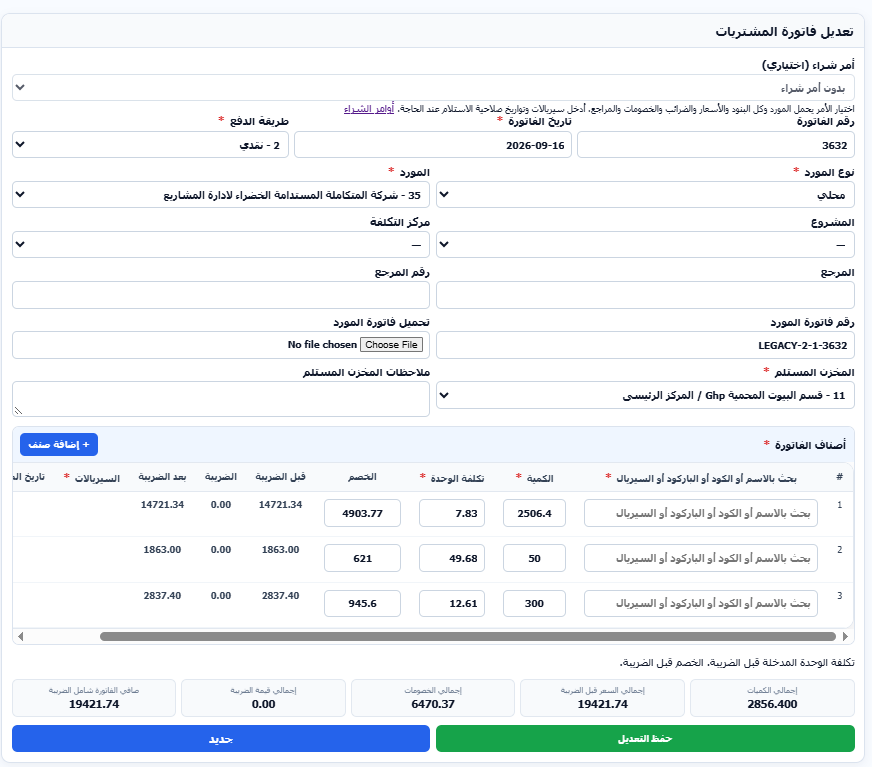
Maintain supplier details and opening balances, and find suppliers by name or code when recording purchases or reviewing accounts.
Prepare purchase orders with items, quantities and prices, then select an order to populate an invoice or enter an invoice directly.
Select the supplier, warehouse, payment method and supplier invoice number, record costs, discounts and tax, and attach the invoice file.
Record returned items against the purchase invoice, with its project and cost center carried into the return.
Track supplier payments, invoices and returns in separate columns and review statements to understand the outstanding balance.
Review detailed or summarized purchases by supplier and period, with invoices linked to their project, cost center and references.
Select the supplier and prepare a purchase order when needed.
Record the invoice, items, costs and receiving warehouse.
Track payments, returns and remaining amounts.